
From Spreadsheets to Decisions: A Practical Guide to Business Dashboards
A useful dashboard does not simply display business performance. It gives a specific person enough trustworthy context to make a better decision. Here is how to define, validate and pilot one.
By Akbar Mohseni, PhD · · 6 min read

This article is the web version of the management guide "From Spreadsheets to Decisions" by Akbar Mohseni, PhD (Northstat AI Solutions Inc., October 2026). All numerical examples are synthetic and illustrative. They are not results from a Northstat client engagement.
Download the guide (PDF)
The six-page management guide by Akbar Mohseni, PhD, including the readiness checklist.
The principle
A useful dashboard does not simply display business performance. It gives a specific person enough trustworthy context to make a better decision.
The guide follows three steps:
- Define: choose the decisions first.
- Validate: agree on the data and the KPIs.
- Act: test whether decisions improve.
Start with the decision
Build around actions, not charts
Organizations often have more reporting than insight. Finance, sales and operations may each maintain spreadsheets that describe the same activity differently. The problem is rarely the absence of a colorful chart. It is the absence of a shared answer to a practical business question.
Before selecting a BI platform, ask managers what they must decide each week. Choose only a few recurring decisions, then work backward to the information they need.
A three-decision brief
| Decision | The question it answers |
|---|---|
| 1. Staffing | Where will next week's workload exceed available capacity? |
| 2. Sales follow-up | Which qualified opportunities need attention today? |
| 3. Reordering | What stock may run short before the next delivery? |
Define each KPI as a contract
Every key performance indicator should have an agreed definition before it appears on a dashboard. The essential fields are the metric name, calculation, reporting window, accountable data owner and the decision it supports. The source system and refresh schedule complete the operational definition.
| KPI field | Example: won-deal conversion |
|---|---|
| Calculation | Won opportunities / all opportunities closed in the period |
| Time window | Calendar month, based on close date |
| Owner and source | Sales operations; CRM opportunity history |
| Decision supported | Review qualification and follow-up effectiveness |
| Freshness / caveat | Daily refresh; report counts and segment mix alongside % |
Why the definition matters. A conversion rate calculated from leads created is not interchangeable with one calculated from opportunities closed. Without a common denominator, two accurate spreadsheets can still tell conflicting stories.
Verify the inputs
A polished chart can still be wrong
The most common dashboard errors begin before visualization. One team measures issued invoices; another measures payments received. A late adjustment appears in next month's file; duplicate customer records inflate counts. These are definitional and data-governance problems, not chart-design problems.
Illustrative scenario: one invoice cohort
Synthetic example
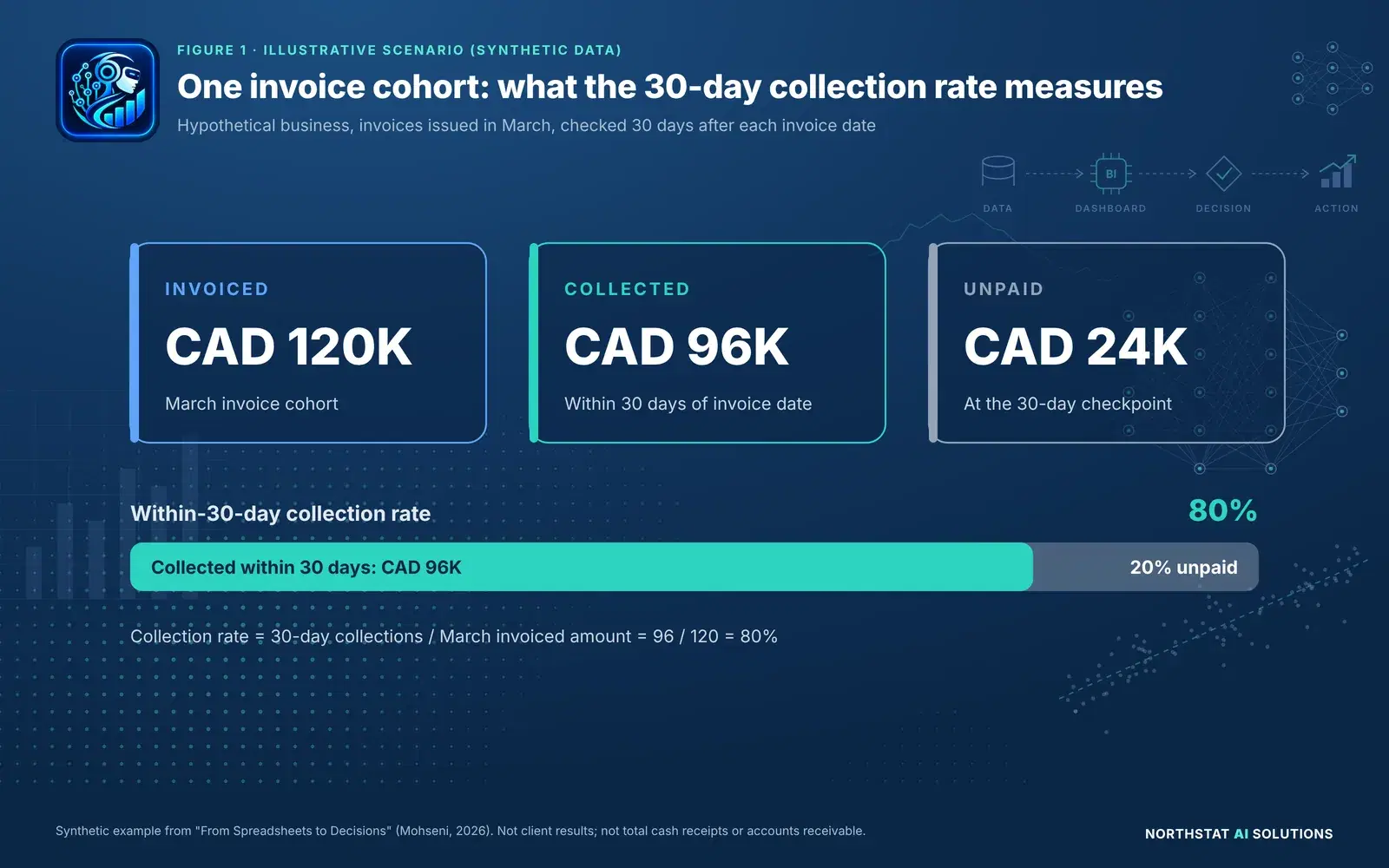
A hypothetical business issues CAD 120,000 of invoices in March. Within 30 days of each invoice date, CAD 96,000 has been collected against those same invoices. The remaining CAD 24,000 is unpaid at that 30-day checkpoint. All figures are synthetic.
Show the data as a table
| Metric | Value (synthetic) |
|---|---|
| Invoiced in March | CAD 120,000 |
| Collected within 30 days | CAD 96,000 |
| Unpaid at day 30 | CAD 24,000 |
| Within-30-day collection rate | 80% |
Metric definitions for this example
| Metric | Precise meaning |
|---|---|
| Invoiced amount | Value of invoices with issue dates in March |
| 30-day collections | Payments applied to those March invoices within 30 days of issue |
| Unpaid at day 30 | March invoice amount less the qualifying 30-day collections |
| Collection rate | 30-day collections / March invoiced amount = 80% |
Important distinction. This is not a statement of total March cash receipts or total accounts receivable. Those require different populations, dates and definitions. The dashboard should say exactly which question its numbers answer.
Make patterns actionable
Choose charts that answer questions
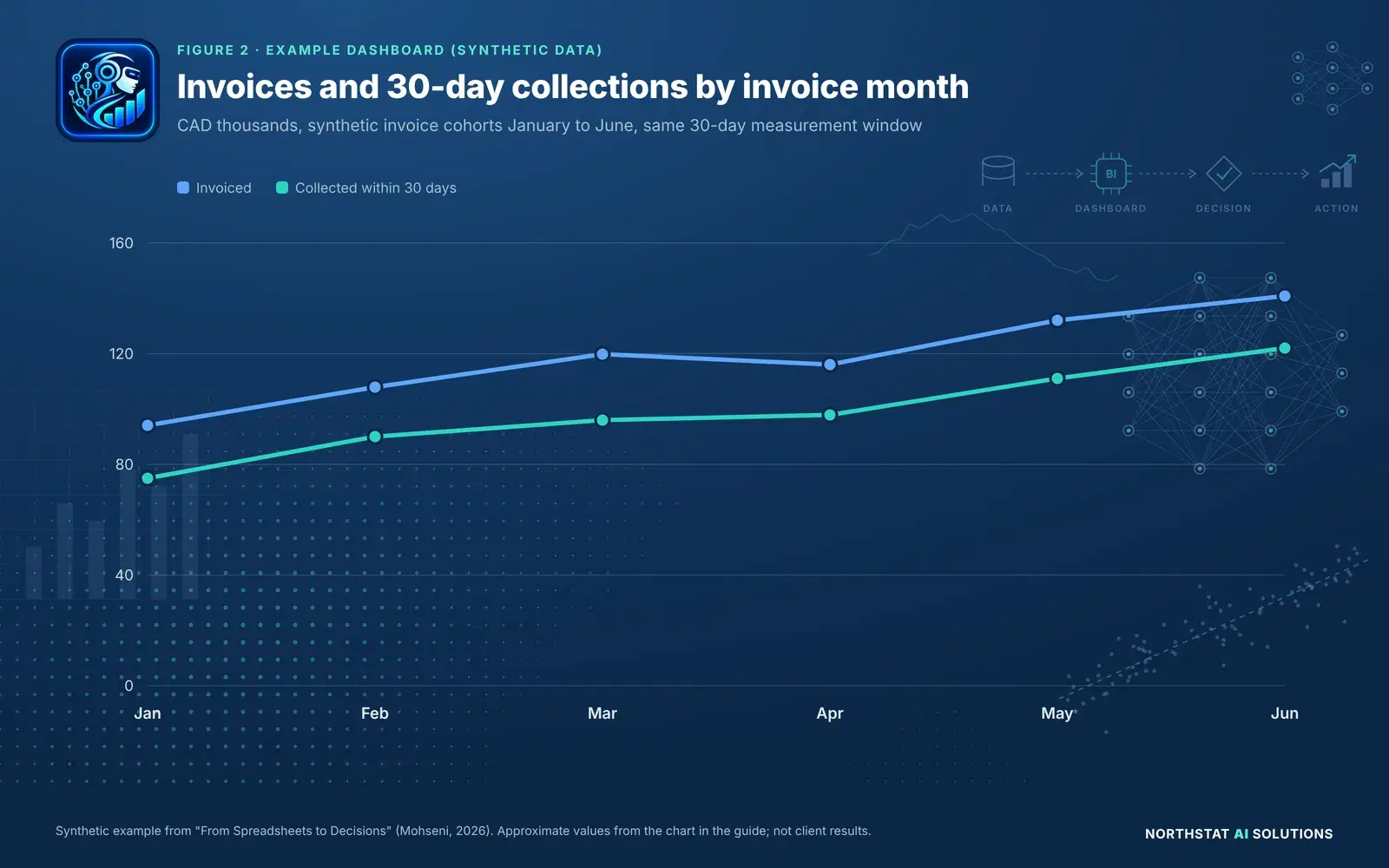
Use a line chart to compare a consistent metric over time, bars to compare categories, and a table when exact operational details matter more than visual shape. Label units and denominators, display the last refresh time, and use color for exceptions rather than decoration.
Synthetic example
Show the data as a table
| Invoice month | Invoiced (CAD thousands, approx.) | Collected within 30 days (CAD thousands, approx.) |
|---|---|---|
| Jan | 94 | 75 |
| Feb | 108 | 90 |
| Mar | 120 | 96 |
| Apr | 116 | 98 |
| May | 132 | 111 |
| Jun | 141 | 122 |
What this suggests: the value collected within 30 days rises across the six synthetic cohorts, but some invoices remain unpaid at the checkpoint. A manager might segment these balances by customer, aging and payment terms before adjusting collection workflows. The chart alone does not prove why the pattern changed.
What to show beside the visualization
| Element | What to show |
|---|---|
| Trend | Add prior-period comparison and explain any seasonality. |
| Exception | Highlight movements that cross an agreed business threshold. |
| Definition | Show calculation, unit, population and refresh timestamp. |
| Action | Name the owner and the specific follow-up the metric supports. |
Pilot before you scale
A small dashboard with a real job
A first release should be narrow enough to test with the people who will actually use it. Start with one business function and three to six stable measures. Give users the ability to question an unexpected number and trace it back to its source.
A practical five-stage rollout
- Frame the decision. Identify the manager, frequency, business action and success measure.
- Audit the sources. Reconcile identifiers, duplicates, late entries and refresh schedules.
- Build a lean prototype. Show a few KPIs, relevant comparisons and drill-down details.
- Observe actual use. Ask which decision changed, who acted and what was learned.
- Govern and expand. Document ownership, permissions and metric changes before scaling.
Example pilot: the weekly collections review
Instead of asking the finance team to maintain multiple copies of the same spreadsheet, a small dashboard could display invoice cohorts, the share collected within 30 days, overdue balances by customer and the dates of the latest updates. The team can then assign follow-up and record what action was taken.
Measure whether the pilot helps. Track the time spent reconciling reports, the number of definition disputes, whether follow-ups happen on schedule, and the usefulness of the answers at the decision meeting. Better presentation is not enough; the pilot should improve the decision process.
Make it trustworthy
A dashboard readiness checklist
Use this checklist before approving any dashboard for ongoing management use. A dashboard becomes a dependable business tool only when the numbers are defined, data limitations are visible and someone owns the decisions it supports.
- Define three decisions. Identify the person, cadence and action for each decision.
- Inventory source systems. List spreadsheets, finance tools, CRM and operational systems.
- Agree on KPI definitions. Document the population, formula, denominator and time window.
- Test data quality. Review duplicates, missing values and inconsistent identifiers.
- Prototype simply. Start with a clear trend, comparison and supporting detail.
- Set refresh and access. Define when data updates and who can see sensitive information.
- Pilot with real users. Observe decisions and record unresolved questions.
- Assign long-term owners. Maintain the dictionary, checks and change history.
The Northstat approach
We help organizations turn fragmented reporting into usable business intelligence: clarifying questions, validating data, agreeing on metrics and building dashboards that support everyday decisions. The starting point is not a tool purchase. It is a decision worth improving.
Ready to make your business reporting more useful? Explore our Business Intelligence and Data Engineering services, or discuss a focused dashboard pilot.
Note: All numerical examples in this guide are synthetic and illustrative. They are not results from a Northstat client engagement. Figures describe invoice cohorts at consistent checkpoints and should not be interpreted as total cash flow or full accounts receivable.
Written by
Akbar Mohseni, PhD
Founder, Northstat AI Solutions Inc.
Related reading
How AI-Driven Data Analysis Improves Business Performance: A Review of the Evidence
What 19 studies, experiments and statistical releases show about AI, data analysis and business results, with Canada's Q2 2026 adoption figures, plain-English methods and a clearly hypothetical impact calculator.
· 12 min read